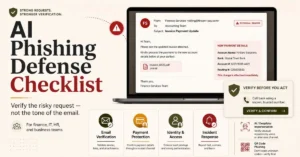
The phishing e-mail I have been concerned about recently is a fake bank’s broken English e-mail.
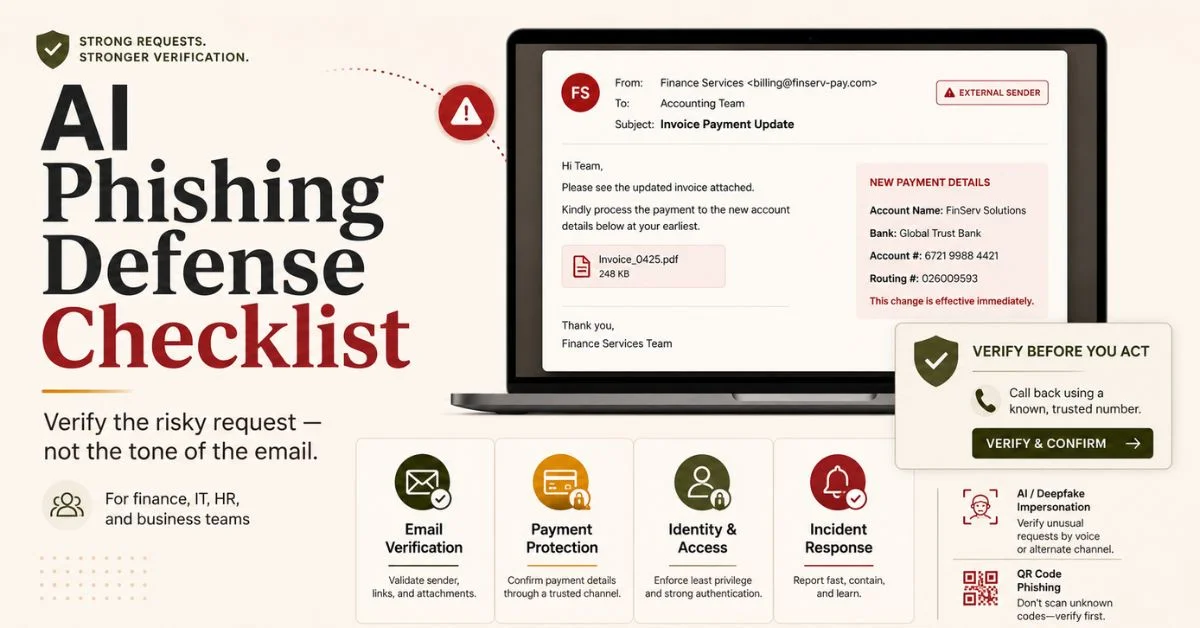
It’s the smooth salesperson email that uses the proper departmentese, references a legitimate billing cycle, says it’s an “invoice payment” and requests that one weary employee please confirm the new payment information before the end of the day. That is the one that’s accepted. Not because there is no security tools in the business. As it seems like a regular request.
This AI phishing defense checklist is designed for business owners, finance teams, IT managers, operations teams, and small teams of security defenders, who are looking to do more than just reduce the risk of phishing attacks they’re looking to stop just one phishing message from becoming a payment loss, an account takeover, a data leak, or a customer trust issue.
It was a no-fuss, no muss rule of the old days. Identify errors in spelling. Hover over links. Avoid any unusual connections.
That’s a good tip, but it doesn’t seem to be sufficient in today’s world.
The quality of phishing has changed with the assistance of AI. Attackers can write a more professional message, develop a more convincing pretext, mimic executive voice and deceive executives, forge supplier conversations, and convert scams into fluent content, and customize the lures with publicly available information. The business defense needs to progress from “catch the odd e-mail” to confirm the hazardous request.
That shift matters.
Professional looking emails are not safe to open, even if they appear to be phishing emails. An email that looks professional will not be considered safe. Professionalism
becomes a part of the attack in 2026.
Why AI Phishing Is Harder to Catch Than Old Phishing
Traditional phishing was a technique where it was volume based. Attackers’ spam was in a mass-mailing that they hoped would yield sufficient clicks. There were many of those messages that were misspoken. The grammar used was peculiar. The design was of a poor quality. The request seemed to be a tangential request to the recipient’s work.
The weaknesses of the attacker is enhanced with AI assisted phishing.
It is now possible to have a fake email that sounds like a finance manager! It’s possible to use an appropriate tone in a fake supplier message. It can seem normal and mundane when it’s a fake HR e-mail. A bogus IT warning may be in the same terms that employees receive when logging on to a legitimate tool at work, and be a reference to a legitimate problem.
That’s the thing that is painful.
There’s the risk of attackers being able to make other phishing emails, too. The greater threat is that they can develop better threats quicker.
Captcha Phishing
In the first quarter of 2026, Microsoft said it had seen a substantial increase in phishing threats that are being sent via email, and noted that QR-code phishing, CAPTCHA phishing, business email compromise (BEC) phishing, and payload evolution were all on the rise. Numbers are not what is important, it’s the direction. The attackers aren’t resting on their laurels. How they are tailoring to existing defenses put in place by businesses.
Academic studies have revealed that QR-code phishing and phishing via LLM is a reality for organizations. Researchers uncovered QR-code phishing is hard for operational detectors and LLM assisted social engineering can be effective at luring employees to the landing pages in one study in 2025 which involved over 71,000 simulated phishing emails.
It is not to say all of the emails that are written by AI are bad. It indicates that the traditional visual cues have not been as pronounced as in the past.
The Business Mistake That Makes Phishing Work
Many companies have the biggest phishing vulnerability, other than email security, in their systems.
This is the process of designing workflows.
Having spam filtering, antivirus, endpoint protection, and multi-factor authentication isn’t enough to save money if one of the payment processes relies on trust, speed and email approval for it. That is not just a technology failure, it’s a whole system failure. It’s a business process error.
The most dangerous workflows are usually ordinary:
- Changing supplier bank details.
- Approving urgent invoices.
- Resetting employee passwords.
- Sharing customer exports.
- Installing browser extensions.
- Granting access to shared drives.
- Sending payroll or tax documents.
- Responding to a senior executive request.
If these actions are able to take place, just from pressure via email, then the business has provided attackers a clear path. Not hacking the entire company is the attacker’s prerogative. It’s just that they have to request it in a fair looking manner so that an employee will go through the process too quickly.
That is why I don’t like cybersecurity tips from which the only message to the employees is be careful.
Even the careful person may make an error under pressure!
A more robust defense is to ask for verification out of line with the suspicious message for any suspicious action. The business should have protocols to safeguard personnel in the event the message appears to be convincing.

The AI Phishing Defense Checklist for Business Teams
Before the next phishing attack gets to one of the team’s finance, HR, support, sales, IT or leadership staff, use this checklist to see how ready your team is.
Mark on the point scale the extent to which it is true for each item.
This article also might be very helpfull for you: How Ransomware Crippled MGM And What to Do Next
If the control was previously created and is being used by employees then use Ready. If it does, it is Partly if it’s only partially present. For controls that are not present or informal, use Not ready.
Email and Message Verification
| Readiness checkpoint | Why it matters |
|---|---|
| Employees are trained to treat polished messages as suspicious when the request is risky | Good writing is no longer proof of legitimacy |
| Payment requests are verified through a known second channel | Attackers often control the contact details inside the phishing email |
| Employees know not to use phone numbers provided in suspicious emails | The number may belong to the attacker |
| Domain names are checked carefully for lookalike spelling | Subtle domain changes can impersonate trusted brands |
| Reply to addresses are checked when a request feels unusual | Spoofed messages may reveal a different reply path |
| Attachments from unexpected senders are treated as unsafe until verified | Malicious files still remain common delivery tools |
| QR codes in emails are not scanned without verification | QR codes can bypass normal email link inspection |
| Employees are trained to report suspicious messages without fear | Fast reporting helps contain damage |
Finance and Payment Protection
| Readiness checkpoint | Why it matters |
|---|---|
| Bank detail changes require verbal confirmation with a saved contact | Fake supplier updates are a common fraud path |
| Large payments require two person approval | One pressured employee should not carry the full risk |
| Urgent payment requests are automatically slowed down | Urgency is a social engineering tactic |
| New vendor payment details are held for review before use | A delay can stop a fraudulent transfer |
| Finance uses a written callback policy | Verification should not depend on memory |
| Invoice changes are checked against previous supplier records | Attackers often alter one detail inside a familiar process |
| Payroll changes require identity verification outside email | Payroll phishing can redirect employee salary payments |
| Gift card and personal purchase requests are banned as company process | Legitimate businesses should not operate that way |
Identity and Access Controls
| Readiness checkpoint | Why it matters |
|---|---|
| Multi factor authentication is enabled on all business email accounts | Password theft alone should not give access |
| Admin accounts use phishing resistant authentication where possible | High risk accounts need stronger protection |
| Password reset requests require identity verification | Help desk impersonation can lead to account takeover |
| MFA reset requests are reviewed carefully | Attackers often target recovery processes |
| Employees do not approve unexpected MFA prompts | MFA fatigue can trick users into granting access |
| Login alerts are reviewed for unusual locations or devices | Compromised accounts often show abnormal behavior |
| Shared accounts are avoided | Shared access makes accountability weak |
| Former employee accounts are removed quickly | Old accounts can become quiet entry points |
AI and Deepfake Awareness
| Readiness checkpoint | Why it matters |
|---|---|
| Employees know that AI can produce convincing business emails | Awareness must match the current threat |
| Voice requests for payments or data require callback verification | Voice cloning risk makes voice alone unsafe |
| Video call requests involving money or access are verified when unusual | Deepfake risk is growing around executive impersonation |
| Teams use verification phrases for sensitive requests | A simple internal phrase can slow impersonation |
| Executives avoid posting excessive travel and schedule details publicly | Attackers use public context to improve pretexts |
| Employees are trained not to trust urgency plus secrecy | That combination should trigger escalation |
| HR and finance staff receive extra phishing training | These teams handle valuable data and money |
| Customer support staff verify identity before changing account details | Support workflows are often targeted |
Technical Email Protection
| Readiness checkpoint | Why it matters |
|---|---|
| SPF, DKIM, and DMARC are configured for the company domain | Email authentication reduces domain spoofing risk |
| DMARC reports are reviewed or monitored | Configuration without monitoring leaves blind spots |
| Suspicious email banners are enabled for external senders | Clear labels help employees slow down |
| Email filtering is tuned for QR codes and attachments | Modern phishing does not rely only on links |
| Security tools inspect links at click time where possible | Some malicious links activate after delivery |
| Browser isolation or safe link protection is used for high risk teams | Risky clicks should not expose core systems |
| Endpoint protection is active on employee devices | Phishing often leads to malware or credential theft |
| Mobile devices are included in security policy | QR phishing often moves users from email to phone |
Incident Response Readiness
| Readiness checkpoint | Why it matters |
|---|---|
| Employees know how to report phishing quickly | Speed matters after a click or credential entry |
| The company has a phishing response owner | Someone must coordinate the first hour |
| Compromised passwords can be reset immediately | Delay increases account takeover risk |
| Sessions can be revoked across business tools | Password resets alone may not end active access |
| Finance knows how to contact banks quickly after fraud | Recovery windows can be short |
| IT can search for similar emails across mailboxes | One reported email may be part of a wider campaign |
| Customers can be notified if data exposure occurs | Trust depends on clear response |
| The business runs phishing drills at least quarterly | Practice reveals process gaps before attackers do |
This checklist is not meant to shame employees. It is meant to make the business honest about where one believable message could still cause damage.
How to Use This AI Phishing Defense Checklist Without Slowing Everyone Down
The only thing that a checklist will do is to become part of the business flow if it is to be effective.
Don’t expect a change in behaviour when giving an employee a long document. The first step is to follow the checklist for the three workflows that attackers are most interested in payments, access, and sharing of sensitive information.
This helps to make the rollout viable.
If you’re in the finance department, you can pay attention to any changes in vendors, approval of invoices, payroll updates, and the need for immediate transfers. For the IT, it’s all about password resets, MFA resets, admin login and suspicious activity alerts. HR or Operations concentrate on employee files, contracts, personal identification documents and internal documents.
It’s not to check all the innocuous messages. The purpose is to confirm all the high risk activities.
You found this article very helpfull: AI Is Finding Security Flaws Faster Than Hackers
That is an important consideration. If a team attempts to check everything, then it will ignore the process. Having a team with clear idea about what requests need to be verified, can move faster and safer.

A Realistic Scenario (The Fake Vendor Payment Update)
Typical implementation scenario is like this.
The company gets an e-mail message from an identified supplier that has been its supplier for 2 years. The supplier has informed the company that they have switched banks and the company needs to make sure to update their payment details before the next invoice cycle. The tone is calm. The following signature is correct. The invoice number is the same as the kind of invoice that the company is normally billed with.
Everybody remains calm as no tension is created.
That is why it works.
The finance assistant brings up to date the banking details in the accounting system. The name of the supplier is known and an invoice is accepted by the manager. The giro is sent out. Two days later the actual supplier inquires about the reason for the failure to pay the invoice.
There are now two issues with the company.
It’s had a loss to it and it’s still indebted to the actual supplier.
The safer way to work would have prevented the attack to take place prior to payment. A bank detail change shouldn’t contain a number in the email, it should be called back from a bank contact that has been stored. It is important for the callback to be logged. The change should be approved by a second person prior to using the new account. If the supplier is not verifiable then payment should be suspended.
That may sound slow.
It is much faster than trying to recover a fraudulent transfer after the money has moved.
The 10 Minute Verification Rule
I would give the following the simplest framework to a small business team.
If the request requires verification of any money, credentials of the person, customers’ information, employees’ information, admin access, payment data, legal documents or account recovery, it will be paused for 10 minutes for verification.
A break during that time, the employee doesn’t respond to the suspicious message. The message doesn’t include the number that they call. They don’t take in a QR code. They don’t read the attachment again. And they don’t require the sender to “confirm” in the very same email exchange.</p>
They are verified via a trusted channel other than the one that was
used. This could involve dialling the number of a supplier you’ve saved, looking it up in the company directory, visiting the supplier’s portal straight, messaging the manager via an in house chat system or having IT have a look at the message.
Legitimate message, 10 minutes seems annoying. This is like a cheap date when someone is lying on you.
The opposite of that is true too; that you do not necessarily require more tools initially to defend against phishing attacks. Businesses have a need to have improved stopping points. Employees who don’t take a break between message and action are a target for attackers.
What to Do in the First 24 Hours After an AI Phishing Attack
The phishing response should be a mundane, quick and documented response.
The company shouldn’t lose an hour blaming the employee for clicking a link, entering credentials, scanning a QR code, approving an MFA prompt, etc., or opening a suspicious attachment or sending information. Blame slows reporting. The business has the opportunity to get to know because of reporting.
First 15 Minutes
Confirm what happened.
Query the opened message, clicking of a link, entered information, account involved and download of a file. Keep the e-mail or message in case it is a scam. Don’t delete it until it is reviewed by IT and/or the security owner.
If credentials provided, reset their password now and cancel the sessions.
Call the bank or payment provider if information regarding payments has been altered or payments have been made.
First Hour
You can find messages that match the criteria in other mailboxes.
Often, attackers send the same message to a number of employees, but with slight modifications. If someone tells you, there’s a chance that others have heard too. Delete/quarantine if possible related messages.
Review sign-in logs for any unusual locations, devices, failed sign-in attempts and for successful sign-in attempts that do not match the expected employee’s behavior.
Look at activity in any affected account or shared drives, finance systems, CRM records or admin panels if they had access to the information.
First 6 Hours
Determine the radius of a blast cloud.
Which of these accounts did you affect? Which systems did you use? Was data downloaded? Did you add forwarding rules to your e-mail? Did new methods of MFA get registered? Are permissions for the OAuth apps granted? Was external sharing of files done?
It’s here that numerous businesses miss the second step of the attack.
Resetting the password does not necessarily put an end to the phishing incident. Attackers can set up forwarding rules, recovery, hidden inbox rules, connected apps or new admin account.
First 24 Hours
Document the incident.
Record what, when, who, which, what and why occurred and what is still to be done. Escalate to legal/customer, compliance, insurance, or external incident response as necessary if it involves customer or regulated data or financial loss.
Then take the incident as an opportunity to make the control better.
In case the attack has been using a fake invoice, strengthen the verification of payments. If it is a MFA fatigue issue, make it more difficult to get authentication. Update training and filtering if it was a QR code. In the case of a help desk reset, enhance identity verifications.
A change in the process should result in the lesson. If that’s not the case, then the same attack will be in a slightly cleaner form next time.
Why MFA Alone Is Not Enough Anymore
One of the greatest protections for a business is still Multi factor authentication. However, it is not a 100% protection from phishing attacks.
Attackers have adapted. Certain phishing kits are able to obtain logins and session tokens. In some of the attacks, the users are tricked to approve the MFA prompts. Several flows for the recovery of target accounts. Some pretend to be member of the IT department or help desk to reset authentication methods. Some take the attack from the secured desktop to a private mobile device, via QR codes.
This is why it’s important to have a more robust authentication for high risk accounts.
The idea behind FIDO2 and WebAuthn based authentication is to make it harder to fall prey to phishing attacks, as authenticating is linked to the real website via public key cryptography. New research in 2026 still shows it is possible to attack FIDO2 in more advanced scenarios, but also found that such attacks would take significantly more effort to be successful, compared to password phishing.
The simple recommendation for a small or mid sized business is to hire an SEO consultant.
Make sure phishing is used for the authentication of a dmin, finance, executive, IT and accounts that have access to customers’ data and payment systems these are the types of accounts that pose the greatest risk. Have no one wait for all the other employees to be ready. Safeguard accounts that have the greatest risk, first.
What Most Employee Training Gets Wrong
There are numerous phishing training programs in which employees are taught to look for the errors.
That’s helpful but it isn’t a complete answer.
It is also important for staff to be aware of any requests that could be deemed risky. Even a grammatically correct message that requests a change in payment, entry of credentials, to download files urgently, approval of MFA, confidential information, and bypass of a process is suspicious.
The training should be based on DECISIONS, and not on clues. The grammar test can be passed but the business process test can be failed.
That should be the core lesson.
The ideal employee training is brief, multiple and relevant to actual working. Businesses in the financial industry should attempt to make fake invoice changes. It’s important for HR to do fake payroll updates. It is important that IT carry out the practice of resetting passwords using fake requests. Routine practice of fake voice calls and meetings. Just as with the bug, customer support should practice fake account recovery attempts.
Use generic training to develop generic awareness. In the case of Workflow based training, the training results can be used as defense.

The Business Cost of Getting This Wrong
The sum of expenses incurred by a phishing attack will far exceed the stolen amount.
There’s a definite monetary damage. Staff’s time is utilised in investigating. Legal review, customer notification, forensic support and recovery work and insurance reporting may be required. Then there’s the reputation that is lost as customers find out the company gave too much credence to a request to open their wallet at a routine speed check, only to discover that it was a fraud.
In a recent report of Internet crime losses in 2024, the FBI reported that losses from Internet crimes exceeded record high totals in the United States, which included personal data breaches, data extortion and phishing as the top reported categories of Internet crimes. That should concern business teams, as after all, it’s not just an IT problem. It represents financial risk, operational risk and at times it is a customer trust risk.
This Article Have a Complete Cybersecurity Guide For Your Business Don’t Miss This: Complete Guide to Cybersecurity Solutions for Businesses
A strong phishing defense is not about paranoia. It is about making risky actions harder to fake.
Final Recommendation
Hope that staff will be able to identify every spam is not a viable strategy for a business’s phishing defense.
It’s not possible in 2026.
This is the better standard, If you can do anything of the following, it is a request that needs to be verified outside of the message that created the request: Move money, expose data, change access, reset identity, bypass normal workflow.
Review Your Current Controls with this Phishing Defense Checklist using AI. If you have to begin with an account, it should be finance, IT (information technology), HR (human resources), and leadership. Set the 10 minute risky requests verification rule. Get high risk users to the phishing resistant authentication method. Conduct one phishing drill each quarter, using a workflow.
If you do only one thing this week do this.
Develop a written policy for payment changes and for recovery of accounts and ensure that all employees are trained in the importance of always verifying before doing anything.
This one stop control will not prevent all phishing attacks. But it is possible to prevent the one that can have a severe impact on a business.
A polished message is not proof of trust. In 2026, the safest businesses verify the action, not the tone of the email.
Expert Insight
The best security tip gained from recent phishing studies is that an employee’s ability to pick up on visual clues is not enough; companies should also educate their employees on the indicators of phishing. All the types of successful phishing attacks, from QR code phishing to LLM-generated pretexts, business email compromise, and MFA targeting attacks follow a similar pattern. Attackers are crafting around the typical behaviors of users. The robust defense combines phishing resistant authentication, independent verification, process controls and quick reporting.
FAQ
What Is an AI Phishing Defense Checklist?
An AI phishing defense checklist is a practical review that helps a business protect employees, payments, accounts, and sensitive data from phishing messages improved by AI generated writing, personalization, voice imitation, or fake workflows.
Why Is AI Phishing More Dangerous Than Normal Phishing?
AI phishing is more dangerous because attackers can create cleaner, more believable messages at scale. These messages may use better grammar, business context, realistic tone, and personalized details that make them harder for employees to spot.
How Can a Business Stop Fake Invoice Phishing?
A business can reduce fake invoice phishing by requiring callback verification through a saved contact, using two person approval for payment changes, delaying new bank details before first payment, and keeping a written audit trail for vendor updates.
Does MFA Stop AI Phishing?
MFA helps, but it does not stop every phishing attack. Some attackers target MFA prompts, session tokens, recovery flows, and help desk resets. High risk accounts should use phishing resistant authentication where possible.
What Should Employees Do After Clicking a Phishing Link?
Employees should report the incident immediately, avoid deleting the message, reset affected passwords, revoke active sessions if possible, and let IT or the security owner check whether similar messages reached other employees.
What Is the 10 Minute Verification Rule?
The 10 minute verification rule means any request involving money, credentials, customer data, employee data, admin access, or payment changes must pause for independent verification through a trusted channel before action is taken.
Author Bio
Talha Qureshi is an enterprise technology analyst and blogger with over a decade of hands-on experience across cybersecurity, cloud infrastructure, B2B SaaS, and enterprise AI. He writes about the gap between how enterprise technology is marketed and how it actually performs in real organizational environments.