Skip to content
Cybersecurity software for small businesses should solve a practical problem: reduce the chance that one stolen password, infected laptop, fraudulent email or failed backup becomes a business-wide incident. Small companies rarely benefit from buying the largest possible security stack. They benefit from covering the highest-impact risks with tools that are configured correctly, monitored consistently and simple enough to operate.
This guide focuses on the essential security layers a small business actually needs, how to prioritize them and how to avoid paying for tools that add dashboards without reducing risk.
Start With Risk, Not a Shopping List
Small-business cybersecurity often begins with antivirus because it is familiar. Endpoint protection is important, but modern business risk also sits in email accounts, cloud applications, administrator credentials, remote access, third-party software and backups. A complete baseline therefore needs multiple layers.
The U.S. Cybersecurity and Infrastructure Security Agency publishes Cybersecurity Performance Goals intended to help organizations prioritize high-impact practices. NIST’s Cybersecurity Framework 2.0 provides a broader structure for governing, identifying, protecting, detecting, responding to and recovering from cyber risk. A small company does not need to implement every possible control before improving security. It needs a risk-based sequence.
The Essential Small-Business Security Stack
| Layer | Primary Purpose | Minimum Capability to Look For |
|---|---|---|
| Identity and access | Stop stolen credentials from becoming full account compromise | MFA, centralized identity, role-based access, admin separation |
| Email security | Reduce phishing, malicious attachments and impersonation | Spam/phishing filtering, malicious-link protection, domain protections |
| Endpoint security | Protect laptops and desktops from malware and suspicious behavior | Managed endpoint protection or EDR, isolation, tamper protection |
| Patch and vulnerability management | Reduce exposure to known weaknesses | Asset visibility, update status, vulnerability prioritization |
| Cloud and SaaS security | Control access to business data in cloud applications | SSO where practical, audit logs, permission reviews, secure sharing controls |
| Backup and recovery | Restore operations after ransomware, deletion or system failure | Isolated or immutable copies, retention, restore testing |
| Monitoring and response | Detect suspicious activity and coordinate action | Central alerts, escalation process, managed monitoring if internal capacity is limited |
1. Identity Security Should Come First
Many business systems are now accessible from anywhere, so identity has become a security perimeter. An attacker who obtains a valid password may not need malware at all.
A strong small-business identity baseline includes:
- multi-factor authentication for email, finance, cloud administration and other sensitive systems;
- separate administrator accounts instead of using admin privileges for daily work;
- role-based access so employees receive only what they need;
- immediate access removal when staff or contractors leave;
- password-manager use instead of shared or reused credentials;
- periodic review of privileged accounts and external users.
For many small companies, improving identity controls reduces more risk per dollar than buying another advanced detection product that no one has time to monitor.
2. Email Security Must Address Human-Looking Attacks
Phishing is effective because malicious messages increasingly resemble legitimate business communication. Security should therefore go beyond filtering obvious spam.
Evaluate email protection for malicious links, attachments, spoofing and suspicious sign-in behavior. Domain protections such as SPF, DKIM and DMARC can also help reduce unauthorized use of the company’s domain in email impersonation, although configuration should be tested carefully before moving to restrictive policies.
Technology should be combined with a simple reporting process. Employees need an obvious way to report a suspicious message without trying to investigate it themselves.
3. Endpoint Protection Needs Central Management
A laptop that is not visible to the business cannot be managed reliably. Small companies should favor endpoint security software that allows devices to be centrally enrolled, monitored and isolated when suspicious behavior occurs.
Useful capabilities include:
- malware and behavior-based detection;
- device isolation;
- tamper protection;
- central policy management;
- alert history and investigation context;
- support for the operating systems the business actually uses.
Endpoint detection and response can provide valuable investigation capability, but it also produces alerts that require skilled review. If the company does not have security staff, a managed endpoint or managed detection service may create more value than buying an advanced EDR license and leaving alerts unattended.

4. Patch Management Is a Security Control
Security software cannot compensate indefinitely for unsupported systems or known vulnerabilities that remain unpatched. Businesses should maintain an inventory of laptops, servers, network devices and important applications, then track whether security updates are being applied.
Prioritization matters. Internet-facing systems, actively exploited vulnerabilities, privileged infrastructure and business-critical software should receive faster attention than low-risk assets. The objective is not a perfect patch score. It is reducing the time that high-impact weaknesses remain exploitable.
5. Protect SaaS and Cloud Data
Small businesses often store their most important information in email, cloud drives, CRM, accounting systems and collaboration platforms. Security responsibility does not disappear because the software is hosted by a vendor.
For key SaaS applications, review:
- administrator roles;
- MFA and SSO options;
- external sharing settings;
- public links;
- connected third-party applications;
- audit-log availability;
- data export and backup options;
- offboarding procedures.
Unused integrations deserve particular attention. An old connected application can retain access long after the employee who installed it has forgotten it exists.
6. Backups Need to Survive the Incident
A backup is useful only if the organization can restore from it when production systems are unavailable or compromised. Ransomware and destructive attacks make backup isolation especially important.
A practical recovery program should define:
- which systems and data must be backed up;
- how frequently backups occur;
- how long copies are retained;
- whether an attacker with normal administrator access can delete them;
- the target recovery time;
- who is responsible for restoration;
- how often restore tests are performed.
For a deeper look at this area, see our guide to ransomware protection tools and recovery-first defense.
7. Monitoring Must End With a Response Process
Alerts have little value if no one knows what happens next. Small companies should document a simple escalation path covering account compromise, malware, suspected data exposure, lost devices and ransomware.
The plan should answer:
- Who receives security alerts?
- Who can disable an account or isolate a device?
- Who contacts the IT provider, insurer, legal counsel or affected vendor?
- Where are emergency contact details stored if normal email is unavailable?
- How will evidence and decisions be documented?
This is one reason managed detection and response can be valuable for companies without an internal security operations team. The service should be evaluated on response responsibility and escalation quality, not simply the promise of “24/7 monitoring.”
Managed Security vs In-House Security
| Model | Works Best When | Watch For |
|---|---|---|
| Mostly in-house | The company has skilled IT/security staff and can monitor tools consistently | Coverage gaps during nights, leave and high workload |
| MSP-led | The business needs broad IT operations plus baseline security management | Confirm exactly which security responsibilities are included |
| MDR/MSSP | The company needs specialized detection, investigation and escalation | Clarify response authority, service-level expectations and data access |
| Hybrid | Internal IT owns business context while a specialist monitors and responds | Define handoffs to avoid duplicated or unowned tasks |
A Practical Budget Sequence
When budget is limited, sequence matters more than buying many products at once. A reasonable order for a typical small cloud-based company is:
- Secure identity with MFA, password management and privileged-access discipline.
- Standardize managed endpoints and patching.
- Harden email and train users to report suspicious activity.
- Establish reliable, tested backups.
- Review critical SaaS permissions and sharing.
- Add monitoring and managed response appropriate to the risk level.
- Expand vulnerability management, network controls and specialized tooling as the environment grows.
The sequence should change for businesses with regulated data, industrial systems, public-facing infrastructure or unusual threat exposure.
How to Compare Cybersecurity Vendors
Do not compare vendors only by the number of features. Ask operational questions.
| Evaluation Area | Questions |
|---|---|
| Coverage | Which devices, identities, cloud services and operating systems are supported? |
| Response | Can the provider isolate devices or disable access, or does it only send alerts? |
| Visibility | Can the business see what happened and export its own logs? |
| Administration | How much internal time is required to maintain the platform? |
| Integration | Does it connect with the company’s identity, email and existing IT tools? |
| Data handling | Where is security telemetry stored and who can access it? |
| Commercial terms | What happens to price as devices, users or retention requirements grow? |
| Exit | Can data and configuration be exported if the company changes providers? |
Security Software Does Not Replace Security Management
Tools reduce risk only when the basics around them are maintained. Common failure points include inactive accounts, shared administrator credentials, outdated devices, untested backups, excessive permissions and alerts that no one reviews.
This is why a broader business cybersecurity strategy should include ownership, policies, training, incident response and recovery alongside software.
A 10-Point Small-Business Security Check
- MFA is enforced on critical accounts.
- Administrator access is separate and limited.
- Every business device is inventoried and centrally managed.
- Critical updates are tracked and applied.
- Email and domain protections are configured.
- Important SaaS permissions and integrations are reviewed.
- Backups are isolated and restores are tested.
- Security alerts have a named owner.
- Employees know how to report suspicious activity.
- The company has a written incident contact and escalation plan.
Small Business Cybersecurity Solutions: How to Compare Them
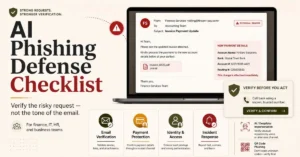
Most small businesses should first secure identity, email, endpoints, patching and recoverable backups, then add monitoring that someone can actually review. Prioritize multi-factor authentication, managed endpoint protection, email authentication and phishing controls, automated updates, and offline or immutable backup copies before buying overlapping tools. Use a written incident contact path and test recovery; our AI phishing defense checklist and cloud backup recovery guide cover two controls that are often missed.
Conclusion
The best cybersecurity software for a small business is not one product. It is a manageable security stack that protects identity, email, endpoints, cloud data and recovery while giving the company a realistic way to detect and respond to incidents. Buying fewer tools and operating them well is usually safer than accumulating security products that nobody owns.
Small businesses should begin with high-impact baseline controls, assign clear responsibility and expand only when risk or operational complexity justifies the next layer. That creates a security program that can grow with the business instead of becoming another collection of unused subscriptions.
Remote and hybrid work adds identity, device-posture and application-access requirements beyond a basic security stack. See the remote-team security framework for controls that work outside the office network.