Skip to content
Cloud cost optimization works best when it is treated as an operating discipline, not a panic response to a large invoice. The fastest savings usually come from visibility, ownership, rightsizing, unused resources, storage controls, and better purchasing decisions.
This guide explains a practical way to reduce cloud waste without pretending that one percentage applies to every environment. Some teams may save far less than 40 percent. Others with heavy waste may save more. The right target depends on the starting point, architecture, workload mix, and reliability requirements.
Do Not Start by Cutting the Most Expensive Resource
The highest-cost service may be the most important service in the environment. It could support production traffic, resilience, backups, compliance, or a critical database.
Start with context instead of deletion.
For every major cost, ask:
- What business process does this support?
- Who owns it?
- Is it production, development, testing, analytics, or temporary?
- What would break if it were changed?
- When was it last reviewed?
This separates expensive but justified infrastructure from expensive and unexplained infrastructure.
Step 1: Build a Cost Map
Export 30 to 90 days of billing and usage data. Group spending by service, account, project, region, team, and environment where possible.
Focus first on the biggest categories because small optimizations rarely matter if one or two services dominate the bill.
Useful categories include:
- compute
- databases
- storage
- data transfer
- Kubernetes and containers
- monitoring and logs
- AI and GPU workloads
- managed services and cloud marketplace products
If a large cost has no owner or business explanation, mark it for investigation.
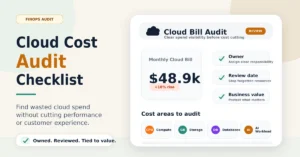
For a full audit workflow, see our cloud cost audit checklist.
Step 2: Rightsize Compute Using Real Usage
Rightsizing means matching resource size to actual workload demand rather than keeping excess capacity permanently.
Review CPU, memory, disk, network, and request patterns over a meaningful period. Look for instances that are consistently underused or environments that were sized for traffic that never arrived.
Do not resize production systems from one metric alone. Low average CPU does not prove that an instance is oversized if memory, latency, burst demand, or resilience requirements justify the capacity.
Common rightsizing opportunities include:
- oversized virtual machines
- development workloads using production-size instances
- clusters with too much idle capacity
- always-on staging environments
- managed databases with excess headroom

Step 3: Remove or Schedule Idle Resources
Idle resources are often easier to eliminate than production capacity.
Check for:
- temporary test servers
- old migration environments
- unused load balancers
- unattached storage volumes
- stale snapshots
- development environments running overnight
- abandoned proof-of-concept projects
For non-production systems, schedules can reduce cost without removing the environment completely. A development stack used only during working hours does not always need to run 24 hours a day.
Confirm ownership before deletion. An unrecognized resource is a research problem first and a deletion candidate second.
Step 4: Audit Kubernetes and Container Waste
Container platforms can hide waste because teams see logical workloads while the bill is driven by the underlying nodes, storage, load balancers, and network services.
Review:
- requested CPU and memory versus actual usage
- idle nodes
- overprovisioned clusters
- duplicate test clusters
- autoscaling configuration
- persistent volumes that are no longer attached to active workloads
A cluster can look busy at the application layer while the infrastructure underneath is still inefficient.
For orchestration context, see our Kubernetes vs Docker Swarm comparison.
Step 5: Fix Storage and Retention Policies
Storage waste grows slowly, which makes it easy to ignore.
Review old backups, snapshots, object storage, logs, and database retention. Make sure each retention policy has a reason tied to operations, recovery, compliance, or analytics.
Do not remove backups simply to save money. A cheaper bill is not useful if recovery fails after an incident.
A good storage review separates:
- active operational data
- required backup or compliance data
- data with no current owner or business need
Lifecycle policies can move older data to lower-cost storage where access patterns allow it.
Step 6: Review Data Transfer and Architecture
Cloud bills can increase because of data movement rather than compute.
Look for cross-region traffic, internet egress, replication, large analytics exports, and data transferred between cloud providers.
The cheapest design is not always the right design. Data residency, latency, availability, and recovery requirements may justify higher transfer cost. The point is to make the cost intentional.
Step 7: Use Commitments Only for Stable Workloads
Reserved instances, savings plans, and committed-use discounts can reduce cost for predictable workloads. They can also lock in waste when purchased too early.
Before committing, confirm that the workload is stable enough to justify the term. Review existing commitments first to make sure they are being fully used.
A discount on unnecessary infrastructure is still unnecessary spending.
Step 8: Put Guardrails Around AI Workloads
AI workloads can create rapid cost growth through GPUs, model endpoints, vector databases, notebooks, data pipelines, and logging.
Every significant AI workload should have:
- an owner
- a budget
- a success metric
- a review date
- a shutdown rule for unsuccessful experiments
Do not allow proof-of-concept infrastructure to become permanent simply because nobody remembered to close it.
Step 9: Reduce Observability Waste Without Blinding the Team
Logging and monitoring are essential, but collecting every event forever can become expensive.
Review:
- debug logging in production
- unused dashboards
- duplicate monitoring platforms
- high-cardinality metrics
- retention longer than operational or compliance needs
Security and incident-response logs may require longer retention. Optimization should never remove visibility that the organization depends on to detect or investigate failures.
Where a 40 Percent Reduction Can Come From
A large reduction is usually the result of several improvements added together, not one dramatic change.
For a hypothetical environment with substantial waste, savings might come from a combination like this:
| Area | Illustrative Contribution |
|---|---|
| Rightsizing compute | 10 to 15 percent |
| Removing idle resources | 5 to 10 percent |
| Storage and retention | 3 to 8 percent |
| Commitment discounts | 5 to 10 percent |
| Governance and scheduling | 3 to 8 percent |
These figures are illustrative, not a benchmark or promise. Actual savings depend on the environment and should be measured from real billing data.
Why Visibility Matters More Than Discounts
A company cannot optimize cloud cost it cannot explain.
This is the core idea behind FinOps. Engineering, finance, and business teams need a shared view of cloud usage and value.
Engineering understands performance and architecture. Finance understands budgets and commitments. Product and business owners understand which workloads create customer or revenue value.
Cloud cost management improves when those teams make decisions together instead of treating the bill as one department’s problem.

What Not to Optimize Aggressively
Cost cutting can create larger costs when teams remove safety margins without understanding why they exist.
Be careful with:
- backup and recovery systems
- production database capacity
- high-availability architecture
- security monitoring
- redundancy required for customer uptime
- regional architecture required for compliance or latency
The goal is efficient infrastructure, not fragile infrastructure.
Make Cost Review a Monthly Habit
One-time cleanup creates temporary savings. Governance keeps those savings from disappearing.
Each month, review:
- largest cost changes
- new high-cost workloads
- unowned resources
- budget alerts
- idle non-production environments
- upcoming commitments and renewals
- AI experiments that should be expanded or shut down
For broader risk context, read Enterprise Cloud Spending Risks That Escalate Operating Expenses.
The Practical Rule for Cutting Cloud Costs
The safest cloud optimization program follows one rule: every major cost should be explainable.
If a resource has a clear owner, a business purpose, a review date, and measurable value, it may be worth the cost. If nobody can explain why it exists, it deserves investigation.
The biggest savings usually come from disciplined operations rather than a hidden optimization trick. Better tagging, ownership, scheduling, rightsizing, retention, and cost review compound over time.
Author
Talha Qureshi is the founder and technology writer behind ITechTrove. He covers enterprise AI, cybersecurity, cloud infrastructure, B2B SaaS and emerging technology, focusing on practical guides, analysis and source-based reporting.